

eGirl Daily
  • Home
  • It Girls
    • Cosplay
    • TikTok & Reels
    • IG Models
    • Models
  • Streamers
    • Streamer Girls
    • YouTubers
  • Tea & Drama
    • Scandals
    • Relationship Tea
  • Gaming
    • Game News
    • Esports
  • Net Buzz
    • Internet & Trends
No Result
View All Result
  • Home
  • It Girls
    • Cosplay
    • TikTok & Reels
    • IG Models
    • Models
  • Streamers
    • Streamer Girls
    • YouTubers
  • Tea & Drama
    • Scandals
    • Relationship Tea
  • Gaming
    • Game News
    • Esports
  • Net Buzz
    • Internet & Trends
No Result
View All Result
eGirl Daily

How to Summon a Laser-Shooting Cat on Chrome

Feeling bored? Here’s a fun way to prank your friends with a laser cat on Google Chrome.

by Chloe Park
July 27, 2026
Reading Time: 2 mins read
0
Share on FacebookShare on Twitter

Today, I’m going to show you how to summon a cat that shoots lasers from its eyes right on your Google Chrome search page.

Step 1: First, head over to the Chrome Web Store here. Then click Add to Chrome.
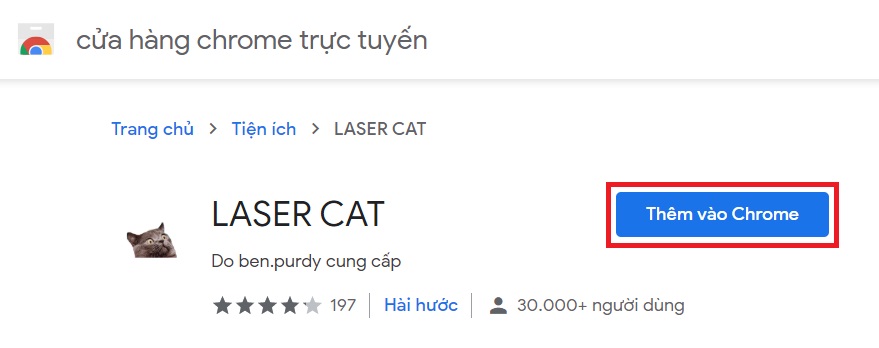
Chrome Web Store Add to Chrome button

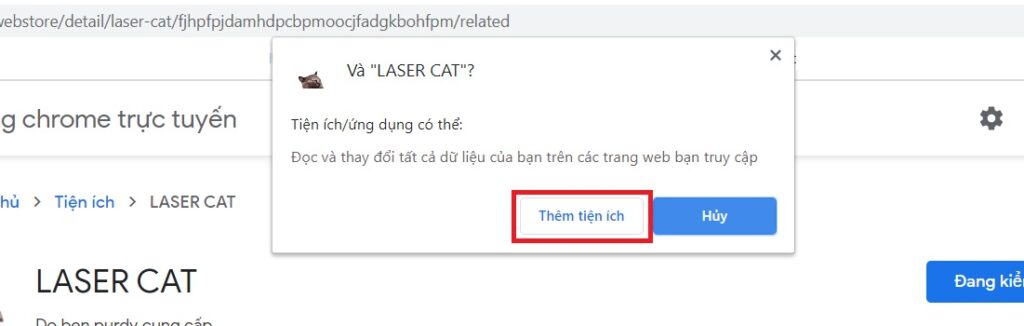
Step 2: When the confirmation popup appears, click Add extension.
RELATED STORIES

AI-Created Beauty Mizuki Heart Draws Nearly 10M Views with Simple Charm

Bad Content Hits Badminton Court with Shocking Stunt

Chrome extension confirmation popup

Step 3: If you see a cat icon appear in the top right corner of Chrome, you’ve successfully added the extension.
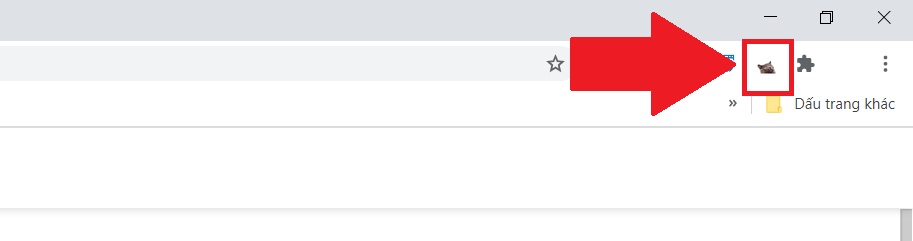
Cat icon in Chrome toolbar

If you don’t see it, click the puzzle piece icon to check your extensions.
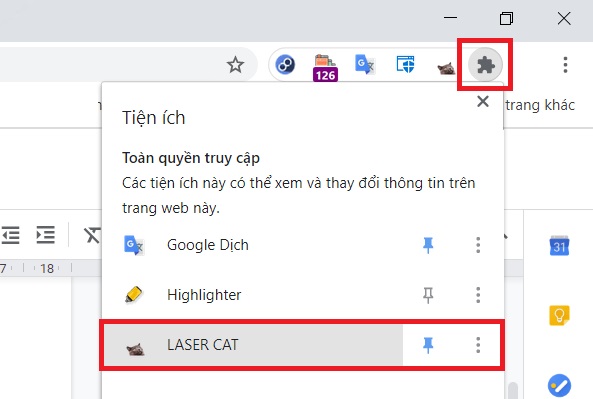
Chrome puzzle piece icon for extensions

Step 4: To summon the cat, type anything into Google and press Enter to load the search results page.

Then click the cat icon in the top right corner. Now, every time you click or hold the mouse anywhere on the search results page, the cat will shoot lasers from its eyes to where you clicked. To dismiss the cat, just click the cat icon again.

Laser cat shooting lasers on Chrome search page

If you want to remove this extension later, just right-click the cat icon and select Remove from Chrome.
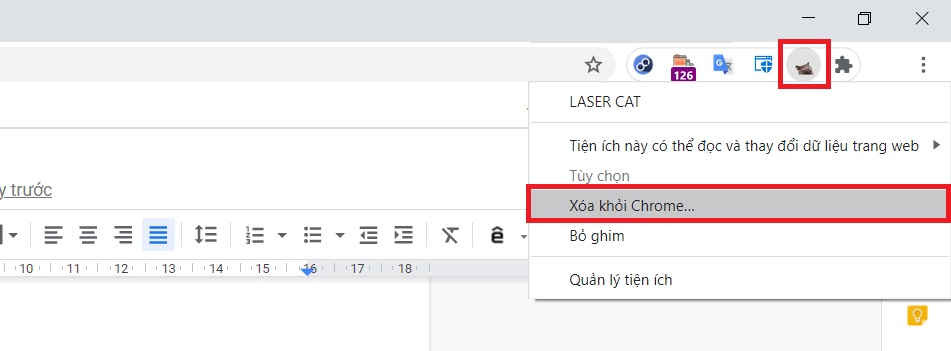
Remove extension option in Chrome

Thanks for reading and have fun!

Tags: chrome extensionfungame newsinternet communitytutorial

Popular

  • The Dark Truth Behind Hidden Spy Cameras and Exploitation Rings

    0 shares
    Share 0 Tweet 0
  • MC Phương Thảo Jokes About Her ‘Bad Luck’ Curse in Liên Quân

    0 shares
    Share 0 Tweet 0
  • Melody Marks Claps Back at Plastic Surgery Rumors

    0 shares
    Share 0 Tweet 0
  • Viral Photo of Student Signing Yearbook on Lingerie Sparks Debate

    0 shares
    Share 0 Tweet 0
  • Paraguayan Fan Sparks AI Beauty Rumors at World Cup 2026

    0 shares
    Share 0 Tweet 0

Latest Stories

Medical Students’ Shocking TikTok Livestream Sparks Outrage

BIBI Sparks Debate with Controversial WATERBOMB Performance

Swiss Team Rep Trần Thị Thanh Hương Breaks Down on Final World Cup 2026 Day

About eGirl Daily

eGirl Daily covers the hottest streamers, cosplay, gaming and viral internet culture, fresh every day. Learn more »

Recent Stories

  • Medical Students’ Shocking TikTok Livestream Sparks Outrage
  • BIBI Sparks Debate with Controversial WATERBOMB Performance

Newsletter

  • About
  • Contact
  • Privacy Policy
  • Terms of Service
  • DMCA

© 2026 eGirl Daily. All rights reserved.

No Result
View All Result
  • Home
  • It Girls
    • Cosplay
    • TikTok & Reels
    • IG Models
    • Models
  • Streamers
    • Streamer Girls
    • YouTubers
  • Tea & Drama
    • Scandals
    • Relationship Tea
  • Gaming
    • Game News
    • Esports
  • Net Buzz
    • Internet & Trends