

Even though Windows remains the most popular operating system for everyday users, the vast majority of professional systems, like internet servers, supercomputers, and space exploration spacecraft, run on Linux. Not to mention billions of smartphones and millions of electric cars worldwide also rely on this platform.
This success isn’t just because Linux is open source. Compared to Windows, the Linux kernel has a unique advantage that makes it ideal for professional systems: stability.
While Windows is infamous for the occasional blue screen of death and often requires restarts after updates or software installs, Linux can run continuously for days, months, or even years without rebooting.

What makes Linux’s stability so unmatched?
According to Melvin Menezes, a computer scientist specializing in distributed operating systems, the secret lies in Linux’s core design philosophy inherited from UNIX.
In reality, every line of code can cause errors, and there’s no way to completely avoid bugs. In other words, all operating systems can fail. The best way to reduce this risk is to keep the operating system’s size as small as possible. No matter the programming technique, increasing the OS size exponentially raises the chance of errors.
Linux and other UNIX-based systems tackle this by defining only the most essential features for an OS, mainly resource management, and limiting the OS to those resources. This is called the kernel, which is kept as small and tight as possible.
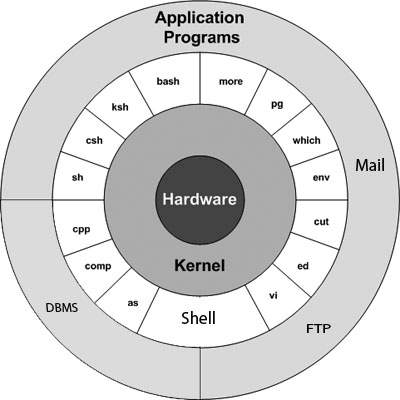
The Linux kernel is isolated from external applications to ensure system security and stability.
It contains the critical features needed for stability and security. Its small size and well-controlled entry points make it more stable and harder to compromise.
Most user-related functions are kept outside the Linux kernel. Programs request resources through APIs, but the Linux kernel is the final authority on granting those requests.
Windows’ different approach
Windows took a different path. From its early days (Windows 3), it had no concept of a kernel. Any user program could directly request resources from the lowest system levels and device APIs.
This started to change with Windows NT under Dave Cutler’s leadership, moving toward a kernel-based OS. But this shift was limited because it conflicted with Microsoft’s market strategy.
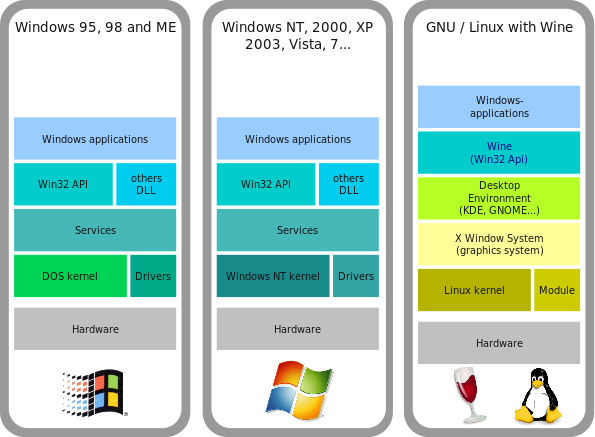
At that time, Microsoft’s goal wasn’t just to control the OS market but to have as many user programs as possible.
With a true kernel-based OS, third-party and built-in applications have equal access to system resources. If you don’t like Unix’s cc compiler, you can buy or write your own. If you don’t like Linux’s basic shell, you can switch to Korn Shell, Bourne Shell, or anything else. Any program you buy or write has the same rights as the OS’s built-in software to access resources.
Microsoft, however, wanted its own programs to have an edge over competitors. They slowly integrated user programs into the Windows kernel, giving their software unmatched access to system resources. This led to legal issues over Microsoft’s monopoly.
The clearest example is Internet Explorer. Without being bundled with Windows, it couldn’t compete with Netscape. Back then, the internet was slow and expensive, making third-party software installs difficult. Even so, IE being pre-installed gave it a huge advantage, helping Microsoft crush Netscape. Plus, privileged access to system resources let IE start faster than competitors.
When accused of abusing monopoly power to boost its programs, Microsoft argued it wasn’t selling a browser because Internet Explorer was “part of the operating system.” This made Windows appear more like a kernel-based OS similar to Linux.
Trading security for convenience
Unfortunately, this business advantage didn’t translate into a technical one. In Linux, even if a browser is compromised, the kernel remains secure. But in Windows, the opposite is true.

Because so many user programs run inside the Windows kernel, if one is hacked, attackers can access the core of the OS. A misbehaving program in Linux can be stopped by the kernel without affecting system stability. In Windows, an unstable user program can crash the entire OS.
That said, security and stability often come at the cost of ease of use. The same applies to Linux and Windows. Microsoft’s OS tends to be more user-friendly. For example, on Linux, you can’t just download and run an .exe file. Linux won’t execute files without explicit user permission, while Windows will.
This is why Linux suits professional users who know exactly what they want from their systems.
In short, Linux’s lightweight kernel approach makes systems more stable, perfect for critical applications like the internet, data centers, and even spacecraft. Its stability improves further when managed by professionals who understand their system’s needs.
Source: Quora

