

eGirl Daily
  • Home
  • It Girls
    • Cosplay
    • TikTok & Reels
    • IG Models
    • Models
  • Streamers
    • Streamer Girls
    • YouTubers
  • Tea & Drama
    • Scandals
    • Relationship Tea
  • Gaming
    • Game News
    • Esports
  • Net Buzz
    • Internet & Trends
No Result
View All Result
  • Home
  • It Girls
    • Cosplay
    • TikTok & Reels
    • IG Models
    • Models
  • Streamers
    • Streamer Girls
    • YouTubers
  • Tea & Drama
    • Scandals
    • Relationship Tea
  • Gaming
    • Game News
    • Esports
  • Net Buzz
    • Internet & Trends
No Result
View All Result
eGirl Daily

iOS 15 Can Track Your iPhone Even When Powered Off or Reset

"This helps you locate your iPhone if the battery is low or it’s been stolen," says Apple.

by Kai Nguyen
July 22, 2026
Reading Time: 2 mins read
0
Share on FacebookShare on Twitter

RELATED STORIES

Tennis Influencer Sparks Backlash for Provocative Tennis Ball Stunt

Tax Officer Turns Heads Online, Revealed as Famous Rich Kid

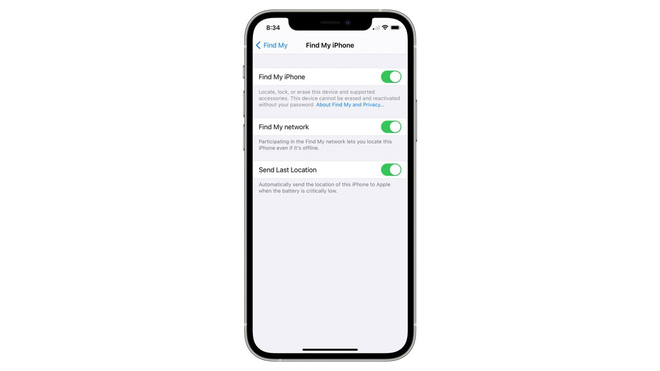
With iOS 15, you can still track your iPhone through the Find My network even when the device is powered off. It seems that with iOS 15, even when your phone is turned off, it’s not completely shut down. Instead, it enters a super low-power mode and works like an AirTag, allowing any nearby iOS device to pick up its Bluetooth signal and send back its location.
iOS 15 Find My network tracking

This also means that if your iPhone runs out of battery, you still have a chance to find its location for a few more hours. In fact, Apple says the tracking feature will even keep working if the phone is reset to factory settings as long as Activation Lock is enabled.

“Locate your device using the Find My network even when it’s turned off. This can help you find a lost device if the battery is low or it may have been turned off by a thief,” Apple explains. Interestingly, Apple usually doesn’t promote Find My features as anti-theft tools.
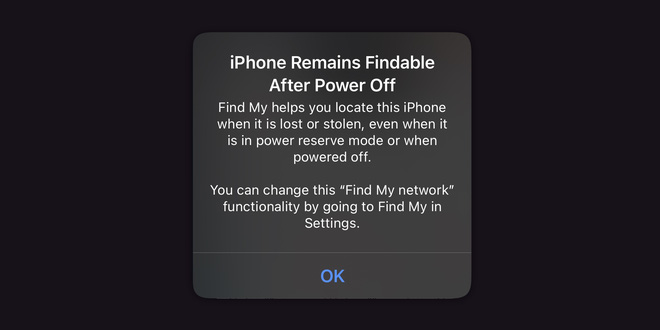
Apple iPhone iOS 15 battery warning

Apple notifies users about this new feature with a warning popup when an iPhone running iOS 15 is about to run out of battery.

If you want to fully power off your iPhone, you can go into Settings and completely disable the Find My network feature.

Source: AppleInsider


Tags: Applegame newsiOS 15online community

Popular

  • The Dark Truth Behind Hidden Spy Cameras and Exploitation Rings

    0 shares
    Share 0 Tweet 0
  • MC Phương Thảo Jokes About Her ‘Bad Luck’ Curse in Liên Quân

    0 shares
    Share 0 Tweet 0
  • Melody Marks Claps Back at Plastic Surgery Rumors

    0 shares
    Share 0 Tweet 0
  • Viral Photo of Student Signing Yearbook on Lingerie Sparks Debate

    0 shares
    Share 0 Tweet 0
  • Paraguayan Fan Sparks AI Beauty Rumors at World Cup 2026

    0 shares
    Share 0 Tweet 0

Latest Stories

TikToker Faces Backlash for Trapping Female Football Fan in Viral Interview

Tennis Influencer Sparks Backlash for Provocative Tennis Ball Stunt

Gấm Kami Shines Bright and Stands Strong Today

About eGirl Daily

eGirl Daily covers the hottest streamers, cosplay, gaming and viral internet culture, fresh every day. Learn more »

Recent Stories

  • TikToker Faces Backlash for Trapping Female Football Fan in Viral Interview
  • Tennis Influencer Sparks Backlash for Provocative Tennis Ball Stunt

Newsletter

  • About
  • Contact
  • Privacy Policy
  • Terms of Service
  • DMCA

© 2026 eGirl Daily. All rights reserved.

No Result
View All Result
  • Home
  • It Girls
    • Cosplay
    • TikTok & Reels
    • IG Models
    • Models
  • Streamers
    • Streamer Girls
    • YouTubers
  • Tea & Drama
    • Scandals
    • Relationship Tea
  • Gaming
    • Game News
    • Esports
  • Net Buzz
    • Internet & Trends