

eGirl Daily
  • Home
  • It Girls
    • Cosplay
    • TikTok & Reels
    • IG Models
    • Models
  • Streamers
    • Streamer Girls
    • YouTubers
  • Tea & Drama
    • Scandals
    • Relationship Tea
  • Gaming
    • Game News
    • Esports
  • Net Buzz
    • Internet & Trends
No Result
View All Result
  • Home
  • It Girls
    • Cosplay
    • TikTok & Reels
    • IG Models
    • Models
  • Streamers
    • Streamer Girls
    • YouTubers
  • Tea & Drama
    • Scandals
    • Relationship Tea
  • Gaming
    • Game News
    • Esports
  • Net Buzz
    • Internet & Trends
No Result
View All Result
eGirl Daily

Fix iPhone and iPad Lag by Clearing Safari Cache

iPhone and iPad often lag when storage is nearly full. The best fix is to delete unnecessary data.

by Jade Lin
July 16, 2026
Reading Time: 1 min read
0
Share on FacebookShare on Twitter

How to Clear Safari Cache

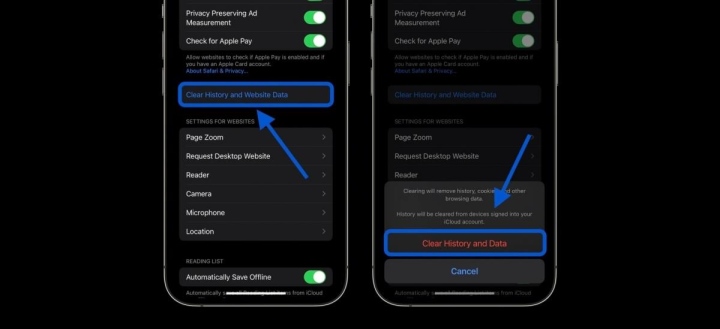
Safari’s cache stores data like browsing history, bookmarks, and other info, which can take up a lot of space on your iPhone or iPad. To free up storage by deleting this data, follow these steps: Open Settings > Scroll down and tap Safari > Scroll down again and tap “Clear History and Website Data” > Confirm.
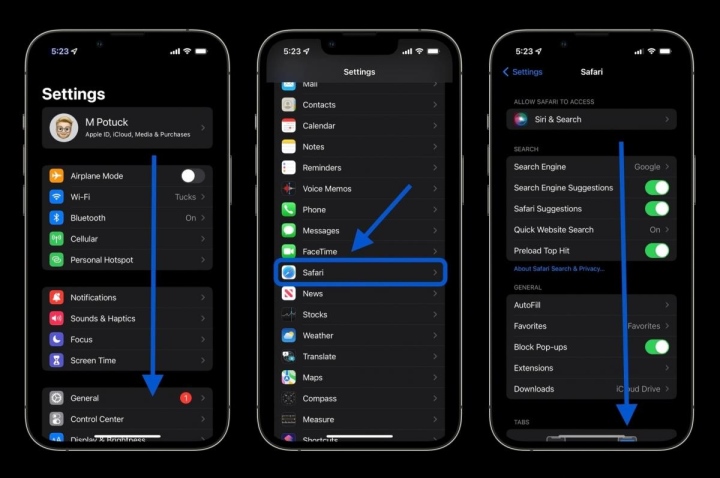
iphone ipad giat lag hay thu xoa bo nho cache lich su duyet web va cookie 20014738 1668584490212 1668584490374863433584
iphone ipad giat lag hay thu xoa bo nho cache lich su duyet web va cookie1 20014789 1668584492038 1668584492115806536722

If you want to delete data from specific websites without clearing all Safari cache, scroll to the bottom of Safari settings, select Advanced > Website Data > Edit (or swipe left to delete individual items).

RELATED STORIES

Tennis Influencer Sparks Backlash for Provocative Tennis Ball Stunt

Tax Officer Turns Heads Online, Revealed as Famous Rich Kid

Note: Safari data will also be deleted on other iPhone/iPad devices logged into the same iCloud account if Safari sync is enabled.

For Third-Party Apps

Clearing cache varies by app developer. You can check if an app allows cache clearing by tapping on it in Settings and looking for the option. For example, Slack lets you clear cache, but Facebook does not.

Some messaging apps like Telegram let you delete unnecessary data directly inside the app.

Keep in mind, clearing cache or browsing history is only a temporary fix. To free up more space, consider deleting unused apps or unwanted photos to maximize storage.

Tags: Featured articleiOSiOS 16iPadiPhoneonline community

Popular

  • The Dark Truth Behind Hidden Spy Cameras and Exploitation Rings

    0 shares
    Share 0 Tweet 0
  • MC Phương Thảo Jokes About Her ‘Bad Luck’ Curse in Liên Quân

    0 shares
    Share 0 Tweet 0
  • Melody Marks Claps Back at Plastic Surgery Rumors

    0 shares
    Share 0 Tweet 0
  • Viral Photo of Student Signing Yearbook on Lingerie Sparks Debate

    0 shares
    Share 0 Tweet 0
  • Paraguayan Fan Sparks AI Beauty Rumors at World Cup 2026

    0 shares
    Share 0 Tweet 0

Latest Stories

TikToker Faces Backlash for Trapping Female Football Fan in Viral Interview

Tennis Influencer Sparks Backlash for Provocative Tennis Ball Stunt

Gấm Kami Shines Bright and Stands Strong Today

About eGirl Daily

eGirl Daily covers the hottest streamers, cosplay, gaming and viral internet culture, fresh every day. Learn more »

Recent Stories

  • TikToker Faces Backlash for Trapping Female Football Fan in Viral Interview
  • Tennis Influencer Sparks Backlash for Provocative Tennis Ball Stunt

Newsletter

  • About
  • Contact
  • Privacy Policy
  • Terms of Service
  • DMCA

© 2026 eGirl Daily. All rights reserved.

No Result
View All Result
  • Home
  • It Girls
    • Cosplay
    • TikTok & Reels
    • IG Models
    • Models
  • Streamers
    • Streamer Girls
    • YouTubers
  • Tea & Drama
    • Scandals
    • Relationship Tea
  • Gaming
    • Game News
    • Esports
  • Net Buzz
    • Internet & Trends